Assignment 1 -
creating a website

Project Information
The goal of this first project in the course Computer Aided Management was to create a website. The purpose of the site is to create a space for both myself and the teacher to review future assignments. An added bonus for me is that when the course is complete, I will have my own homepage.
Prior to starting
Before I began creating the page I watched the following video. The purpose of the video was to show whoever views it how to use pre-made templates to create the page.
I learn best by doing and failing so I thought it best to begin at this point, but retrospectively it would have been wise to gather more information.
Process/Design premises
Prior to starting this assignment I did not have any experience using HTML. In the video I watched it was recommended to use Brackets. Brackets also allows you to "preview" your page before you publish it which is a convenient feature. You can therefore see what you are doing as you go, and can see directly if what you are doing is materializing as you had pictured it in your mind.
Thankfully we were allowed to use pre made templates to create the website. Now all I had to do was to choose a template and begin. I chose the template "Strata" because it was sleek and minimalistic (you can see for yourself here). This template provided me with some problems however. I ran into some problems making the page (as it was set up) look good and be funtional at the same time. This caused me to choose another template, called "Massively", and you can find here. I am much happier with this template and plan on using it moving forward. Now there is nothing left but publishing your site
Publishing the site
After watching the video you can use this as a step by step guide to publish your site via Github:
Step 1
The first thig you should do is open Github, (create an account if you haven't already) and create a repository by clicking new.
.jpg)
Step 2
Fill in this page with the name of your repository.
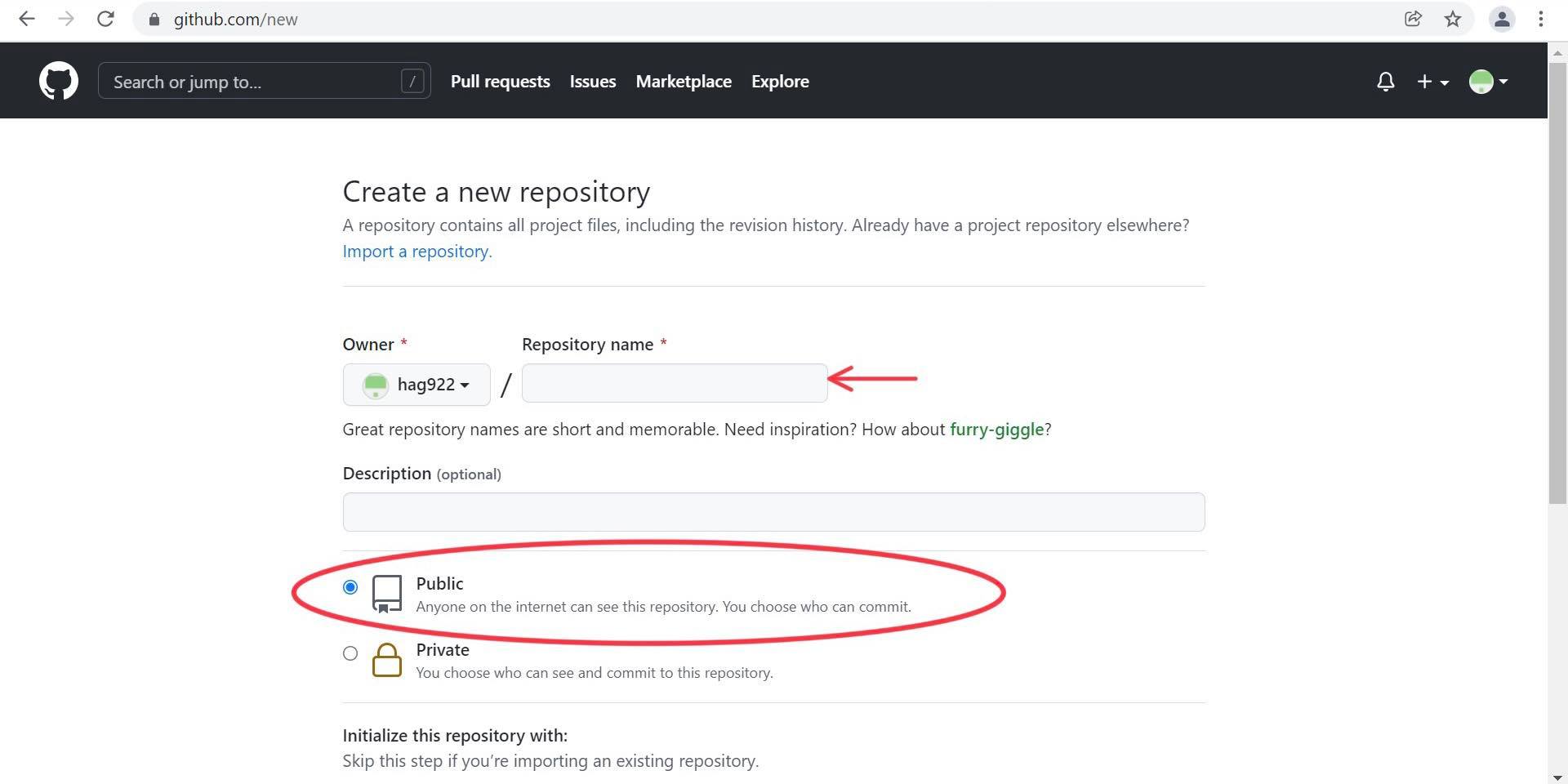
Make sure that you choose Public instead of private. This will enable you to bublish the website, as well as allowing your teacher to grade your assignments.
Step 3
Go into the folder where your wesite is stored locally. If you haven't already, visit this site here and download git. Have you downloaded it? good, then you can proceed.
Go into the folder, right click and click "open with Git Bash"
Step 4
After you created your repository on Github, this page should have popped up:
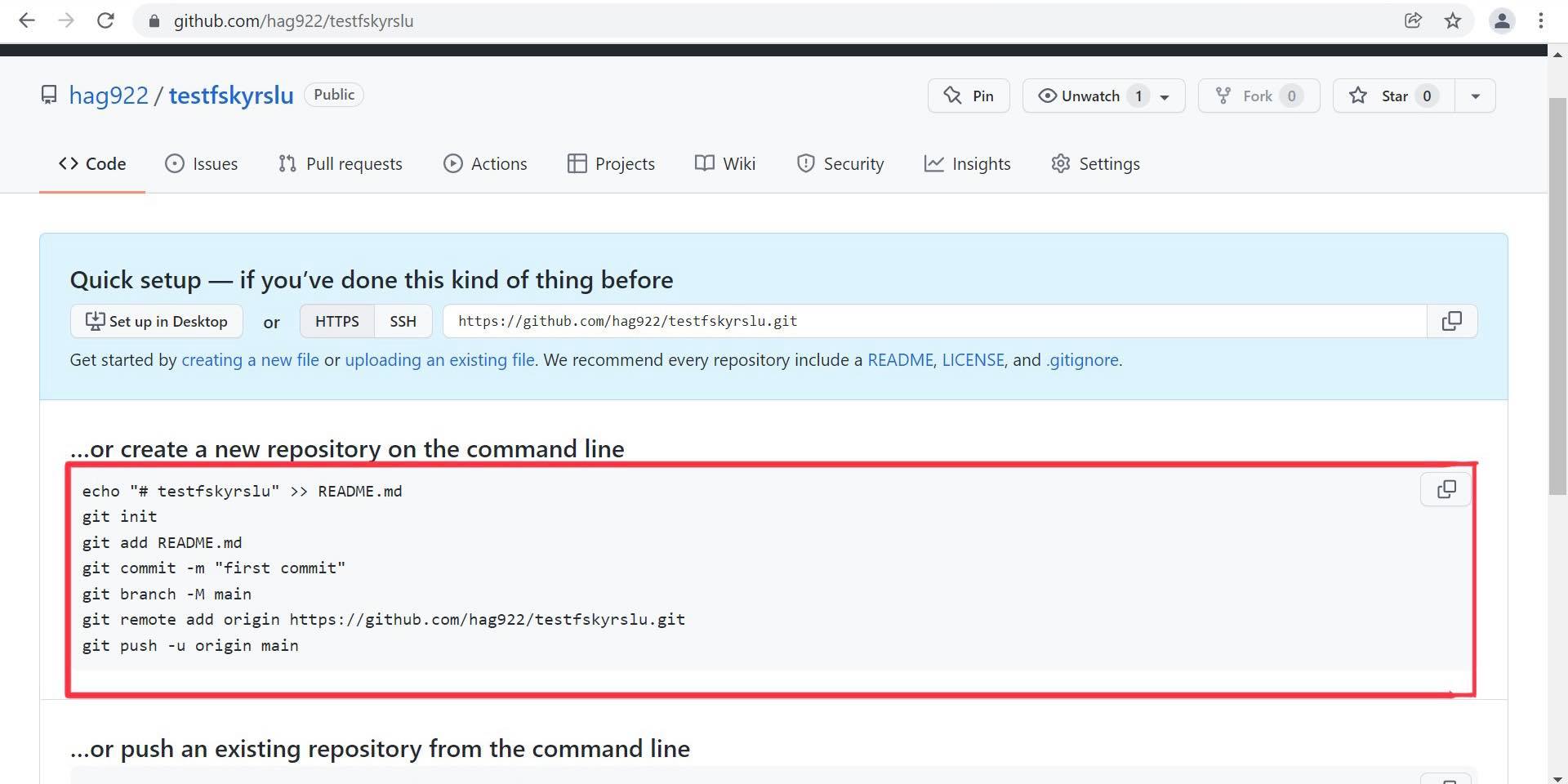
If it didn't, repeat step 2.
Now copy the highlighted section.
Step 5
In the terminal window that opened when you completed step 3, paste the copied section and press enter. If everything goes according to plan the folder should appear in Github (this could take some time, so just grab a cup of coffee and relax.)
Step 6
When you have located all of your files in your repository, open the settings tab here:

Step 7
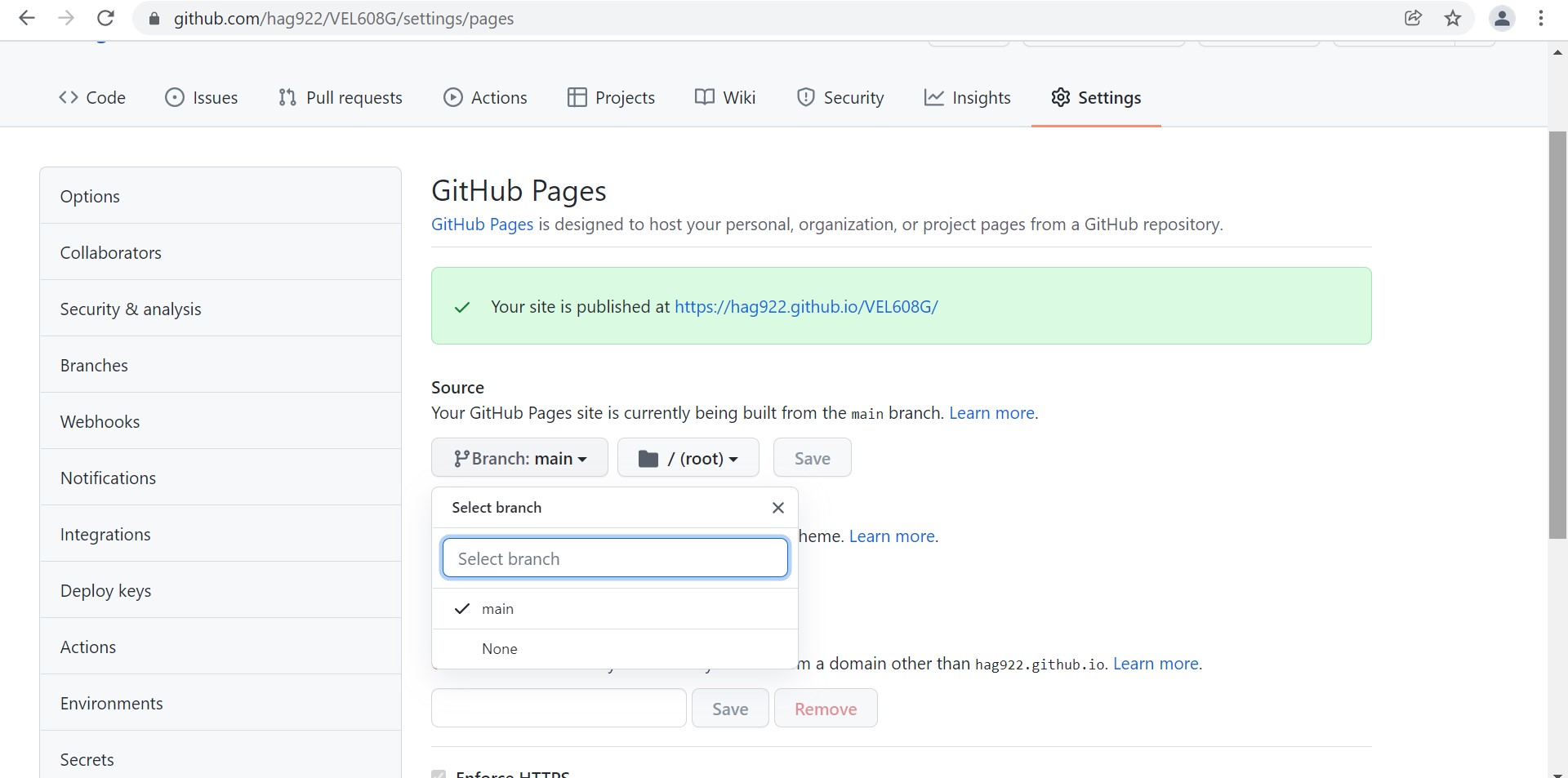
When you've opened settings, click on the Branch drop down, and choose main instead of none. Then click save
Step 8
Now you should be all set, just wait for the page to finish it's setup, and a green banner will pop up, like here:
step 9
Now the only thing left to do is to enjoy and admire your very own homepage :)
Important: your "website" file should be named index, if you rename it might impair setup
Organization
An important aspect for me, was that the site would be fully functional and interactive from the go. This required going through the HTML code, and and forming relationships between different parts and files. one example can be seen here below:
.png)
This is a screenshot from my Brackets session, an consists of the links in my menu tab. This is one of the many buttons I linked together, with the goal that everything "worked" right from the beginning.
I also added a feature which I find important on a page like this, which is the "Back to top" option, when you find yourself at the bottom of the page.
What I did - revised
Here I'll sum up what I did and what I changed after feedback
The main thing I initally prioritized was that the site should be as functional and sleek as possible. I feel like that was accomplished in the "first" try. I however received feedback that the images I origanlly used for the headers on the index page were not descriptive enough so I rectified that and now believe they are plenty descriptive. Another feedback was that a link to the Github repo was missing. This wasn't quite correct as I did install the link on the top of every page, but since I didn't say that anywhere I understand the confusion. To make sure it can be found I'll insert the link here. I also added an "easter egg" of sorts which you'll just have to find yourself ;) .
Finally to list the pages I created initially, I created tabs for my resume, assignments in this course and about the page. Through out the semester I have tweaked these tabs, for example prior to apllying for masters programs and jobs for the summer I made a new CV and therefore updated that on the homepage. Naturally I updated the assignments tab due to me completing more assignments, but I feel that the quality increased with each passing assignment, due to the fact I'm both becoming more comfortable with HTML as well as the fact that I've learned the importance of being thorough in my documentation. Lastly I updated the about tab when I thought of information that could be relevant on a page like this.
Some of these may already be mentioned above but I thought best to list them here:
- Fully functional menus
- Every button has a function
- Correct contact info
- Social media linked
- Added a 404 page for the incomplet assignments
What I looked up
You could call it luck or foresight, but due to the fact that along with the index.html, I also downloaded elements.html, which provided answers to a lot of questions. Additionally, I also figured I could use a lot of what was pre-built into the website and make it my own. Regardless, here below you can find the search terms I needed answers to during the process:
- "how to insert image in html"
- "class= image fit thumb edit thumb"
- "how to insert hyperlink in html"
- "How to create a list in html"
- "How to add a gif to html"
- "How to center a button in html"
What next
Among the things I wold like to fix when I get the chance, is to add a special made logo to my page, as well as fix the visual error in some images when you resize the window.